

Table of contents

TL;DR
A useful quarterly LP presentation explains what happened, how performance changed, and which portfolio developments matter. Build it around approved commentary, readable comparisons, consistent portfolio updates, and editable layouts your team can reuse.
Finance has updated the workbook. The investment team has sent portfolio commentary. Partners have added their observations. The quarterly LP update is due, and someone now needs to bring everything together.
If you work in investor relations, finance, or communications at a VC or private equity firm, that responsibility may sit with you. The information comes from people who know their part of the portfolio well. Your job is to make it work as one presentation.
That means deciding what LPs should see first, which comparisons need explanation, and how much detail belongs on each slide. It also means keeping the presentation consistent as figures change and reviewers add comments.
Quarterly limited partner reporting brings together fund performance, portfolio developments, and commentary for a fund’s investors. The LP update presentation gives that information a readable structure, helping investors understand the quarter and find the detail behind it.
This guide explains how to build that structure using your team’s approved data and commentary.
All images below come from M’idea Hub’s quarterly investor reporting design portfolio. They illustrate a real estate PE reporting framework using fictional company information and sample figures.
Start with what changed this quarter
Opening last quarter’s deck and replacing the numbers is a practical starting point. But it can leave you with a presentation that gives the same emphasis to information whose significance has changed.
Before editing slides, review the approved commentary alongside the current figures. Identify the developments that need the most attention. These might include a realization, a shift in operating performance, an investment milestone, or a challenge that needs more explanation.
For each development, establish what happened, what supports the explanation, and where it belongs in the presentation. The investment and finance teams should own those judgments. The presentation should make their conclusions easy to follow.
Slide headings can help. “Portfolio Performance” identifies a subject. A factual heading explaining the main development gives the reader a starting point for interpreting the information below it. Use that approach where the underlying data and approved commentary support a clear conclusion.
The opening summary should also reflect the balance of the quarter. If a material challenge appears much later in the presentation, the summary may give an incomplete impression.
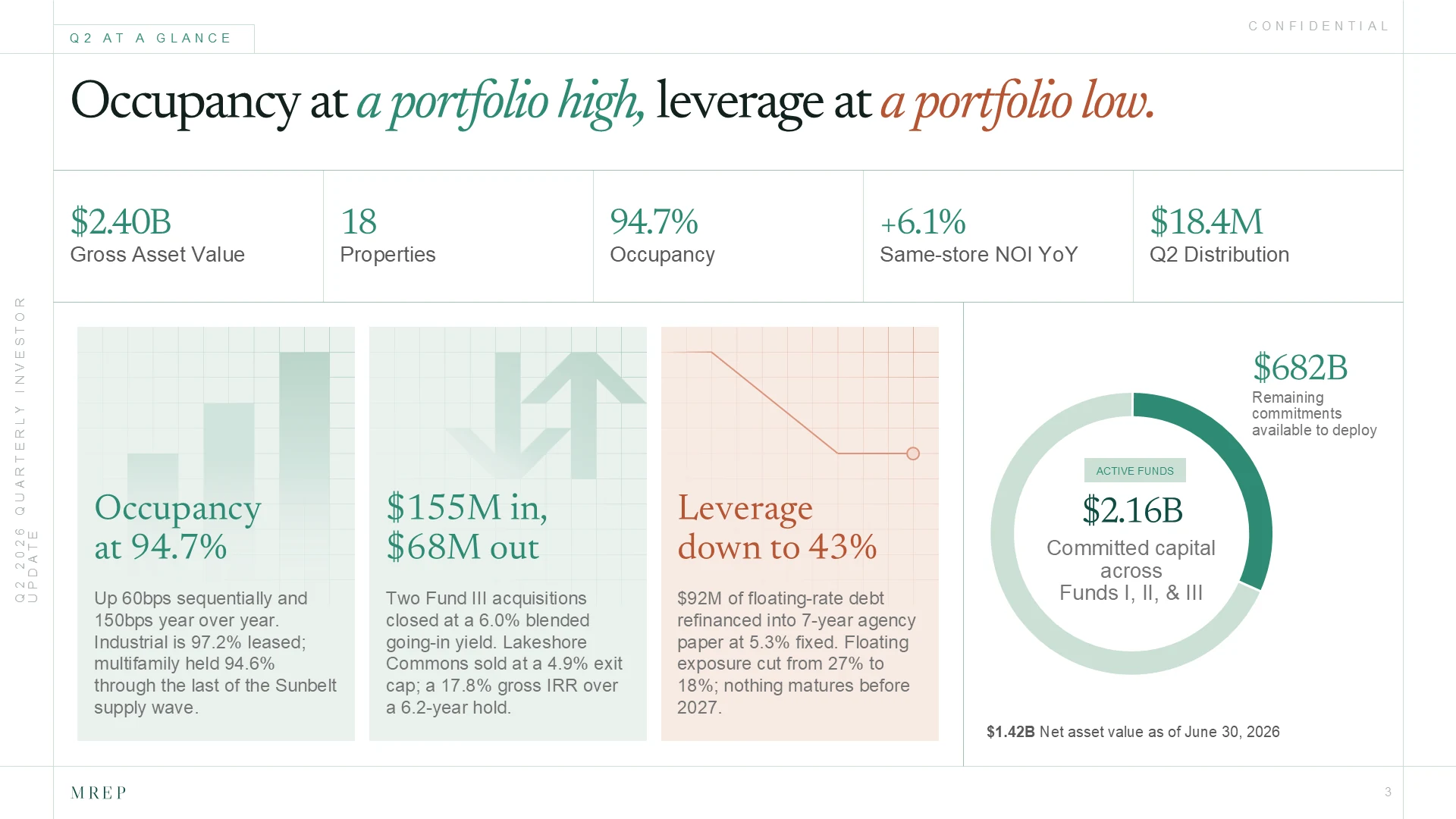
What should a quarterly LP update presentation include?
A quarterly LP update presentation should help readers move from the overall picture to the details behind it.
A practical sequence begins with the quarter’s main developments, followed by fund performance and a portfolio overview. Selected company or asset updates can then explain the developments behind those figures. Relevant investment activity, realizations, challenges, and priorities complete the picture, with supporting detail available afterward.
The exact structure depends on the fund and the reporting materials accompanying the presentation. A venture fund discussing company milestones will need a different balance from a real estate fund explaining asset operations, debt, and distributions.
Consistency still matters. Readers should be able to find familiar information in familiar places. If performance appears near the beginning each quarter, keep it there unless there is a good reason to change the sequence.
Think about how the presentation will be read, too. A deck distributed by email needs enough explanation to stand on its own. A presentation used during an LP call can be more selective, but essential context should survive when someone opens it after the meeting.
The presentation also needs a defined role within the reporting package. It can explain and organize the quarter’s developments while directing readers to the accompanying financial statements, schedules, or other detailed materials.
Turn the performance spreadsheet into a readable slide
Spreadsheets support analysis. Slides need to help a reader understand the relevant result of that analysis.
Copying a large worksheet into PowerPoint often carries over everything: columns used for calculations, internal abbreviations, inconsistent number formats, and details that compete for attention. Making the table smaller usually makes the problem harder to solve.
Start by deciding what the slide needs to communicate. If LPs need to compare exact figures across funds, a well-organized table may be the right choice. If the purpose is to show movement across periods, a chart may make the pattern easier to see.
Then establish a hierarchy. Give the main comparison enough room, group related information, and place explanations close to the figures they describe. Consistent alignment and number formatting can make a financial table much easier to scan without removing useful detail.
Preserve the information that makes the figures understandable. Reporting dates, units, metric definitions, gross or net labels, and relevant notes should remain legible and consistent with approved source materials.
Avoid treating every metric as an oversized headline number. When several figures receive equal emphasis, the reader still has to decide where to begin. Use emphasis deliberately and retain the surrounding context.
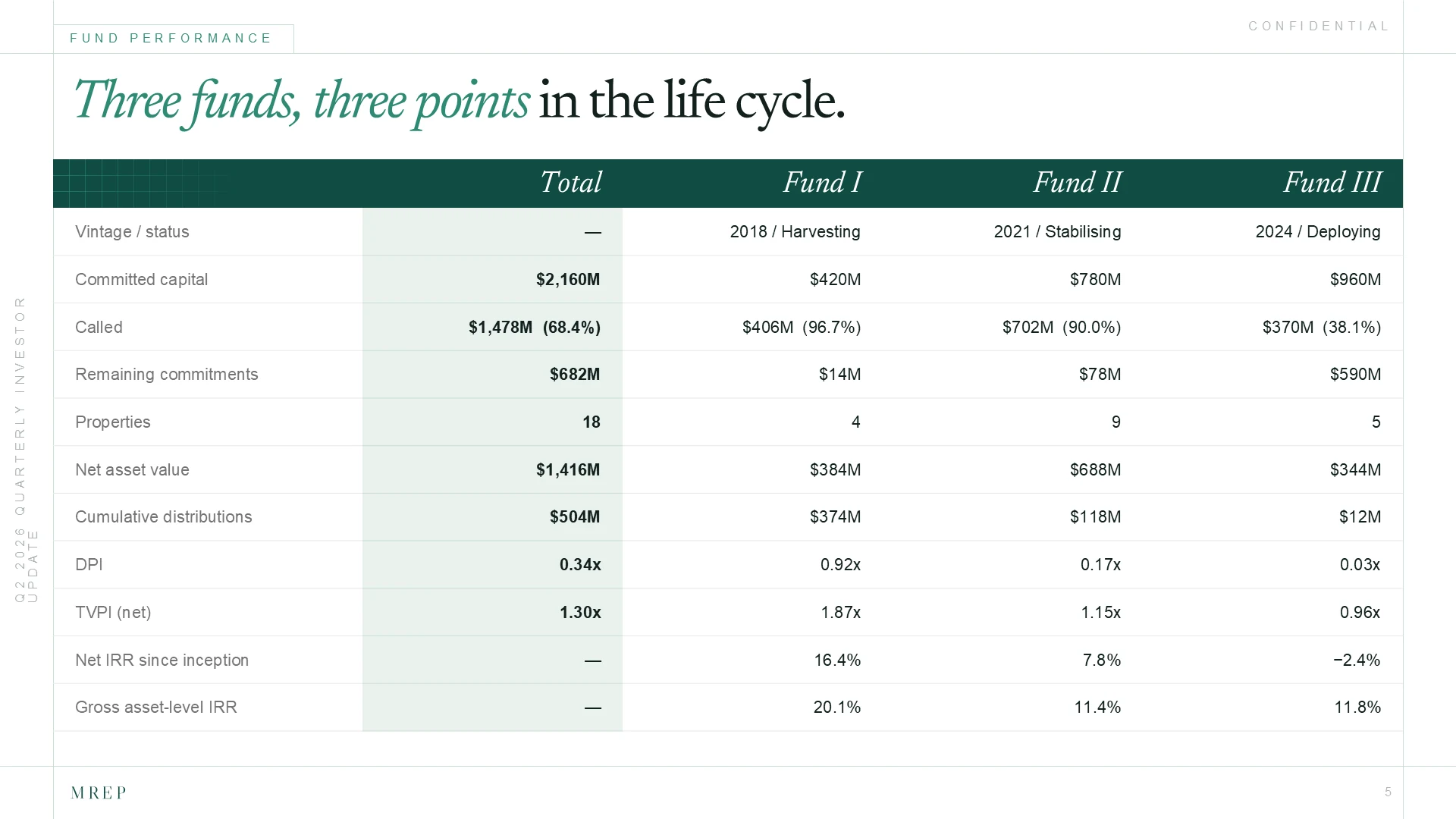
A useful review question is: can someone identify the intended comparison without a presenter explaining where to look? If the answer is no, revisit the layout before adding more commentary.
Make portfolio updates consistent without forcing identical metrics
Portfolio updates often arrive in different forms. One team sends a dashboard. Another provides a paragraph. A third sends slides from a company presentation.
Bringing those materials into one deck requires a common structure.
For a real estate portfolio, that could mean a consistent location for the asset overview, relevant operating information, recent activity, and next priorities. For a VC portfolio, a similar structure might organize company context, selected metrics, milestones, and challenges.
The layout can remain consistent while the measures change. An early-stage company and an established operating business may need different information to explain their progress. Forcing both into identical metric boxes can create comparisons that are not meaningful.
Consistency should help readers find information. It should not make different businesses appear directly comparable when they are not.
Be explicit about reporting periods and unavailable information. If one update uses a different period, label it. If a figure has not been supplied or approved, resolve it with the responsible team rather than filling the space with an assumption.
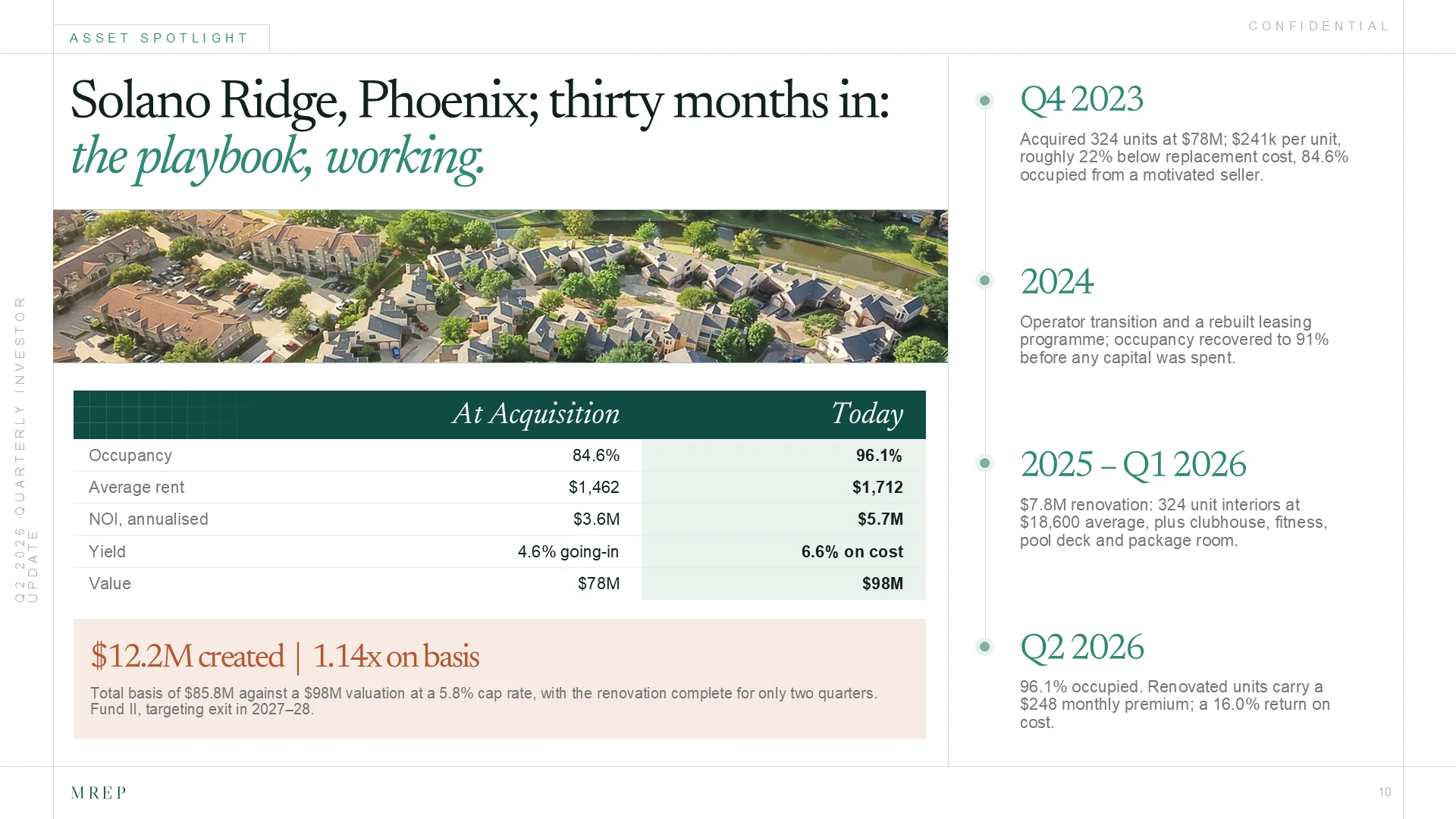
Show what changed since the previous quarter
A current-quarter figure gives readers a snapshot. A relevant comparison helps them understand movement.
Where comparison is useful, place the current and prior-period information together. Make the periods explicit and use consistent units and definitions. Avoid making LPs search the previous presentation to understand a development discussed in the current one.
Choose the comparison that fits the information. Some operating measures may benefit from a year-over-year view because of seasonality. Other developments may be best explained against the previous quarter or an established plan. The fund team should determine the appropriate basis.
Keep chart scales consistent when the purpose is comparison. If a definition, reporting basis, or portfolio composition has changed, explain that change near the relevant visual.
Numbers also need commentary when the reason for movement is not self-evident. Place the approved explanation beside the comparison so the reader can connect them. Repeating the figures in a paragraph adds little; explaining the relevant development makes the slide more useful.
Apply the same discipline to setbacks. A difficult quarter should remain easy to navigate. Clear presentation helps readers locate the issue, understand the explanation, and see the priorities the team has identified.
Build an LP reporting presentation your team can update next quarter
A quarterly investor presentation needs to work for the people maintaining it as well as the people reading it.
Editable charts, reusable layouts, and consistent styles make updates more manageable. They also help preserve the presentation when different team members contribute to it.
Establish a source for each figure and an owner for each section. Source references can sit in working notes or an internal review document. The important point is that reviewers can trace information back to the approved material without searching through email threads.
Separate questions about accuracy and commentary from questions about formatting. A finance reviewer should be able to identify a figure that needs correction without also having to redesign the slide around it.
After late changes, check the presentation as a whole. A revised figure may appear in the opening summary, a performance table, and a chart. Updating one instance does not resolve the others.
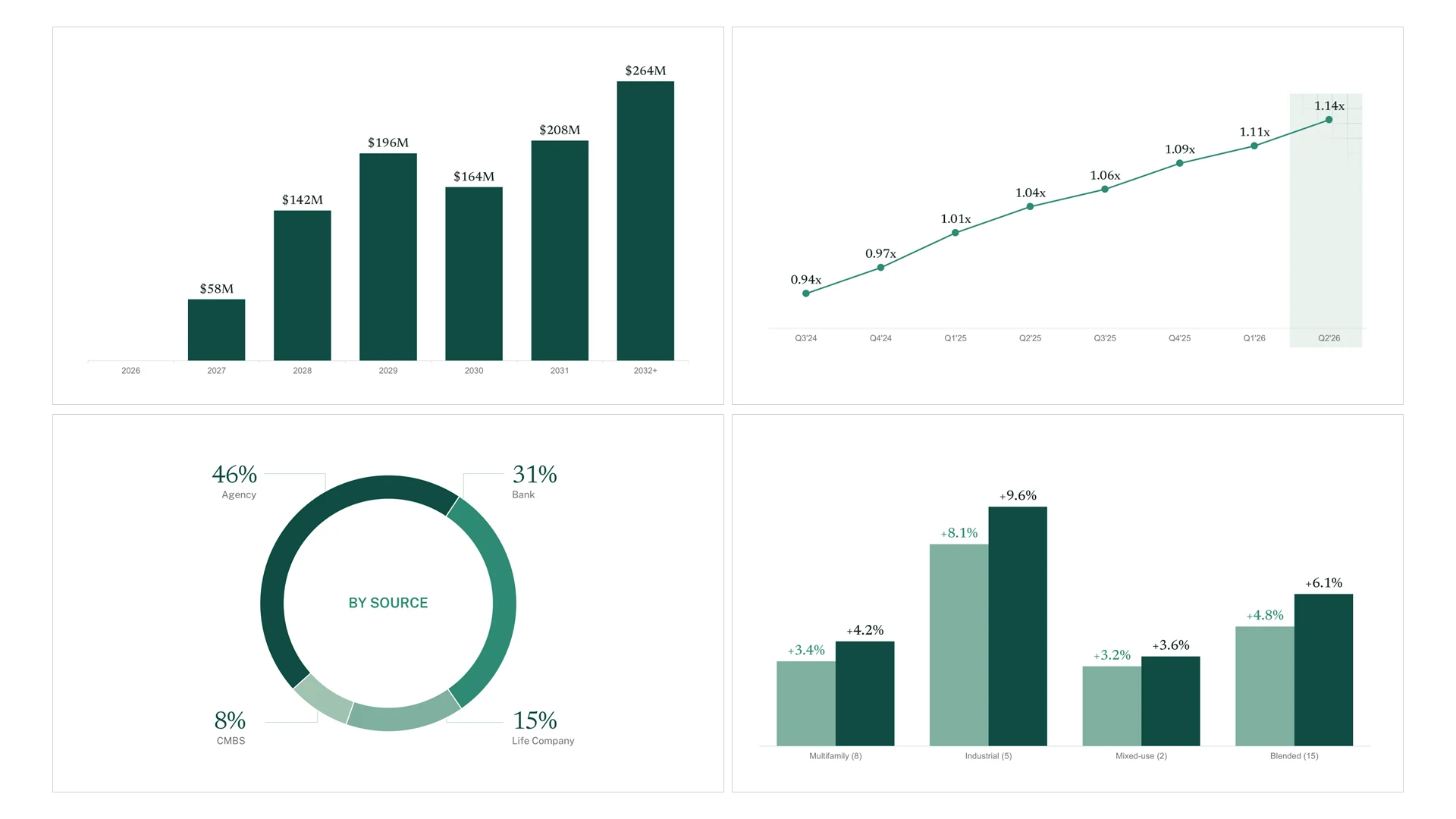
A useful presentation system includes layouts for recurring needs and enough flexibility for new developments. It should accommodate a longer explanation or an additional asset update without forcing the team to improvise a completely different style.
You can explore this approach in M’idea Hub’s illustrative quarterly investor reporting design system.
A presentation partner your team can rely on
Quarterly LP updates are high-stakes work. They represent the firm’s performance and judgment, involve several contributors, and often continue changing close to distribution.
A presentation partner needs to understand that responsibility. The work requires careful handling of supplied information, reliable communication, consistent execution, and files your team can continue using.
M’idea Hub has worked with firms including H.I.G. Capital, Sapphire Ventures, KPS Capital Partners, and MiddleGround Capital. We bring that experience to high-stakes investor presentations, helping fund teams organize complex information, maintain a consistent visual standard, and manage revisions through delivery.
For quarterly updates, our role is to help turn your team’s approved figures and commentary into a cohesive, editable presentation. That includes organizing visual hierarchy, designing charts and tables, bringing different contributions into one system, and refining the slides through review.
For teams with recurring requirements, ongoing presentation design support can provide continuity across quarterly updates and other investor communications.
Before the presentation goes out, check five things:
- Can readers identify the quarter’s main developments?
- Do figures, dates, and labels match the approved sources?
- Are comparisons meaningful and clearly explained?
- Are material challenges and supporting details easy to find?
- Can the team update the presentation next quarter?
Preparing your next quarterly LP update? Explore our VC and private equity presentation design services to see how M’idea Hub can support your team.
Frequently asked questions
What is the difference between an LP report and an LP update presentation?
An LP reporting package may contain financial statements, schedules, account information, and commentary. An LP update presentation provides a visual way to communicate selected performance and portfolio developments. Its scope should fit the fund’s reporting process and complement the accompanying materials.
How much detail should a quarterly LP presentation include?
Include enough information to explain the quarter’s main developments and support the comparisons you present. Keep detailed schedules and supplementary analysis accessible in the appropriate supporting materials. Consider whether readers will receive the presentation on its own or alongside a discussion and a fuller reporting package.
How do you present portfolio companies with different metrics?
Use a consistent structure for company context, relevant measures, developments, and priorities. Adapt the metrics to each business and clearly label periods and definitions. A shared layout makes information easier to locate without suggesting that every company should be evaluated using identical measures.
What makes an LP presentation template reusable each quarter?
A reusable template includes editable charts, practical table styles, recurring slide layouts, and consistent labels and formatting. It also accommodates changes in content. Teams should be able to add a development, expand an explanation, or update an asset profile while preserving the presentation’s overall structure.
.webp)